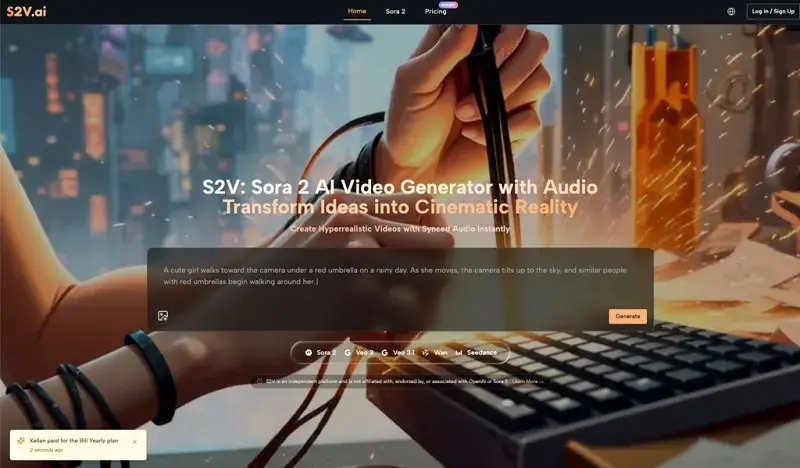
From Curiosity to Creation: A Realistic Roadmap for Adopting the Sora 2 Video Generator
in Technology on February 16, 2026Stepping into the world of AI video for the first time feels a lot like being handed a high-end cinema camera without a manual. You know it’s capable of producing something breathtaking, but your first few attempts might look more like a fever dream than a masterpiece. That’s why having a Realistic Roadmap for Adopting the Sora 2 Video Generator becomes essential. We’ve all seen the viral clips that look indistinguishable from reality, but the journey from a blank prompt box to a polished final render is paved with trial, error, and a fair amount of healthy skepticism.
Here is a structured look at how to navigate the early stages of using Sora 2 and similar tools, focusing on realistic expectations and the gradual improvement of your creative workflow.
The Reality Check: Bridging the Gap Between Hype and Output
The biggest hurdle for any beginner isn’t the technology itself; it’s the expectation that AI is a “magic button.” In my early tests with the Sora 2 Video Generator, I expected that a simple sentence would yield a perfect 10-second clip. The reality is that AI is a collaborator, not a mind-reader.
The Learning Curve of “Prompt Literacy”
When you first start, you’ll likely face what I call the “Uncanny Valley of Intent.” You ask for a person walking down a street, and the AI gives you exactly that—but the lighting is flat, or the gait is slightly robotic. Learning to use Sora 2 AI effectively requires a shift in how you communicate. You aren’t just describing a scene; you are directing a virtual crew. You have to think about focal lengths, lighting temperatures, and atmospheric conditions.
Adjusting Your Expectations
It’s important to realize that not every generation will be a winner. In a professional SaaS environment, we often talk about “iteration cycles.” With Sora 2 Video, your first three renders might be throwaways that help you realize you need to be more specific about the “texture” of the video. This isn’t a failure of the tool; it’s the process of refining the creative signal.
Navigating the S2V Ecosystem: Choosing the Right Engine
One of the most confusing aspects for newcomers is the sheer variety of models available within a single platform. S2V acts as a unified hub, but knowing which model to deploy for a specific task is what separates a hobbyist from a power user.
Breaking Down the Model Hierarchy
The platform integrates several distinct “engines,” each tuned for different creative priorities. Understanding these helps prevent the frustration of using a high-precision tool for a low-stakes task.
| Model Variant | Primary Strength | Best Use Case | Audio Integration |
| Sora 2 Basic | Speed and efficiency | Rapid prototyping & social drafts | Visual only |
| Sora 2 Pro | Cinematic fidelity | High-end ads & hero shots | Visual only |
| Pro Storyboard | Narrative continuity | Multi-scene storytelling | Visual only |
| Veo 3 Series | Audio-visual harmony | Atmospheric & “ready-to-post” clips | Native Audio Included |
The Significance of Native Audio
While much of the focus is on the Sora 2 AI Video Generator, the inclusion of Google’s Veo 3 models introduces a different dimension: sound. For a beginner, trying to sync sound effects to a silent AI clip in post-production can be a nightmare. Using a model that generates ambient noise or synchronized soundscapes natively can save hours of tedious editing, making the early adoption phase much less intimidating.
The Workflow Shift: From Text-to-Video to Image-to-Video
In my first month of hands-on usage, I discovered a trick that changed my entire output quality: I stopped relying solely on text. While the Sora 2 Video Generator is incredibly capable of interpreting natural language, giving the AI a visual “anchor” produces much more consistent results.
The “Anchor” Method
If you have a very specific vision for a character or a product, start with a high-quality static image. By uploading that image into the Sora 2 AI Video Generator, you provide a blueprint for the colors, composition, and subject matter. You then use text to describe the motion rather than the entire scene. This reduces the “hallucination” rate of the AI significantly.
Practical Observations on Motion Control
I’ve noticed that when I describe motion in relative terms—”the camera pans slowly to the left” versus “a fast-moving shot”—the Sora 2 Video engine responds better to cinematic terminology than to abstract descriptions. This is where a basic understanding of film school concepts actually becomes a superpower in the AI era.
Myth-Busting: What AI Video Can and Cannot Do (Yet)
There is a lot of noise surrounding Sora AI Video capabilities. To adopt these tools realistically, we have to strip away the marketing fluff and look at the functional boundaries.
Myth 1: It Replaces the Need for a Script
Actually, the opposite is true. Because Sora 2 AI generates content in segments, having a tight, well-structured script is more important than ever. You need a roadmap to ensure that the clips you generate at 9:00 AM fit with the ones you generate at 2:00 PM.
Myth 2: It’s a “Set It and Forget It” Solution
Many beginners get frustrated when a 10-second clip has a minor glitch in the background. The reality of professional AI video work involves “inpainting” or generating multiple versions of the same shot and stitching the best parts together. It’s a hybrid craft.
Myth 3: High Quality Means High Complexity
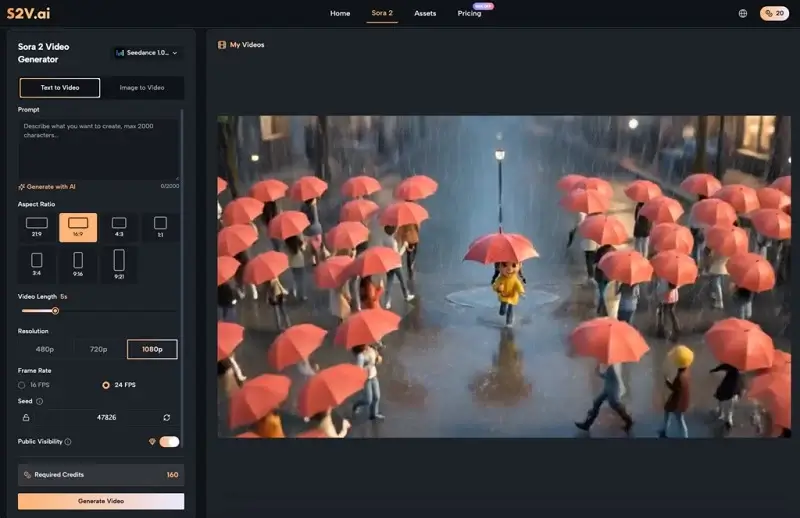
While the underlying tech is complex, the interface of a modern Sora 2 AI Video Generator is designed to be intuitive. You don’t need to be a coder; you just need to be a good observer of the world around you.
Efficiency and Cost: The Pragmatic Side of Adoption
From a strategist’s perspective, the move toward Sora 2 Video isn’t just about the “cool factor”—it’s about resource allocation. Traditional video production is notoriously expensive and slow.
The “B-Roll” Revolution
For many creators, the most immediate value of Sora 2 AI is in generating B-roll. Instead of spending $500 on a stock footage subscription or a day on a location shoot for a 3-second transition, you can generate a bespoke clip that matches your brand colors perfectly—highlighting how important it is to establish your brand consistently across every piece of visual content.
Commercial Rights and Ownership
A major concern for early adopters is the legal landscape. One of the reasons I find the S2V platform practical for business use is the clarity regarding commercial rights. Knowing that the output from the Sora 2 AI Video Generator is yours to use for advertisements or client projects removes a massive layer of anxiety that usually haunts new tech adoption.
The Art of the Pivot: Learning from “Bad” Renders
I want to share a quick insight from a project I worked on recently. I was trying to generate a scene of a futuristic laboratory. The first few results from the Sora 2 Video model were too dark—you couldn’t see the details of the equipment.
Instead of deleting the prompt and starting over, I made one small change: I added “shot on Arri Alexa, high-key lighting, clinical atmosphere.” The difference was night and day. The lesson here is that Sora 2 AI rewards those who treat it like a professional tool rather than a toy. Every “bad” render is actually a piece of data telling you what to clarify in your next prompt.
Building for the Future: The Hybrid Creator
As we look toward the next year of content creation, the distinction between “AI video” and “traditional video” will continue to blur. The goal for a beginner shouldn’t be to replace their entire workflow with Sora 2 AI, but to find the friction points where AI can help.
Gradual Integration Steps
- Start with Social: Use the Sora 2 Video Generator for short-form content where the stakes are lower and experimentation is encouraged.
- Master the Storyboard: Use the Pro Storyboard model to see if you can maintain a character’s look across two different shots.
- Hybrid Editing: Take an AI-generated clip and try to color-grade it to match your smartphone footage.
Final Thoughts on Early Adoption
The journey with Sora 2 Video is less about mastering a software and more about mastering a new way of thinking. It requires a blend of patience, technical curiosity, and the willingness to fail fast. By lowering the barrier to entry, tools like S2V aren’t just making video easier to create—they’re making it possible for a whole new generation of storytellers to see their ideas in motion.
The most important thing you can do today is to stop overthinking the “how” and start exploring the “what if.” The tools are ready; the question is whether you’re ready to iterate.
Related Blog Post


Popular Blog Post



Featured Products