
AI tools for WordPress blog are apps that help website owners.
They can use artificial intelligence to:
- Research topics
- Create content
- Optimize SEO
- Generate images
- Boost blog performance
Are you looking for the best AI tools to build and grow your WordPress website? Experts consider creating a website on WordPress the best option for newbies. But the next step is to publish engaging blogs to generate revenue.
There are different methods of starting a blog website. You can hire a website developer for a professional site. Or, you can build a free website on WordPress. The main challenge in both cases is making the site’s content appealing and optimized.
Blog websites rank over time. Publish 20 – 30 blogs on the website at the start. Newbies can definitely use tools to write effective blog posts in time. This article discusses all the important AI tools for new bloggers. But before that, let’s talk about how WordPress is a safe option for freshers.
Building a Website on WordPress
The most cost-effective way to build a blog is to create your website yourself. It is the cheapest option available. You can do this by using WordPress. You can use different plugins and templates. This includes WooCommerce shipping plugins. They help add advanced features and improve your website’s functionality.
WordPress is a free platform. You need to buy hosting. There are both free and paid hosting plans available. Use it to create a portfolio or start a blog. Here are some points to consider while building your website on your own.
- You need to know about website design.
- You will have full control of your blog.
- It requires you to manage all the aspects: hosting, security, design, etc.
- Themes and plugins make the website look professional. You can also learn how to find which WordPress theme a site is using to identify the design elements and features used by successful websites.
- A $5 – $200 per month fee is an estimated price for a WordPress website.
Tools to Start a Blog on WordPress
AI tools can provide a guideline for new bloggers. They can help create and update content for the website. The growth of the website relies on the quality of the published content. If the content brings in traffic, builds authority, and supports customer retention strategies, the website can generate long-term revenue and business growth.
Custom WordPress development services can boost success. They provide tailored, high-performance solutions. These solutions improve the website’s functionality, user experience, and effectiveness.
Here are some tools for online marketers that can help beginners start a blog on WordPress in less time.
1. Blog Idea Generator
Users only click on a title if they find it informative and interesting. That’s why a captivating blog topic is crucial for generating more traffic. The blog topic must be unique and relevant to a specific niche.
A blog idea generator helps create unique and creative topics for websites. It is an AI-powered tool that works by analyzing keywords and phrases. Based on the analysis, it generates a topic that relates to the subject of the blog.
Features:
- This tool can create SEO-friendly titles.
- It generates multiple results at once.
- It creates a whole topic using a single keyword.
2. Semrush – Keyword Researcher
Search engines find the user’s query in their indexed content. Then, they display the best matches at the top of the results page. There is a high chance of ranking if your blog has all the keywords used while searching.
A keyword-rich blog will rank on search engines. Keywords tell Google that the user is looking for this particular content. Semrush is one of the most popular SEO tools for keyword research, competitor analysis, and improving website visibility.
Semrush can help you find keywords most relevant to the topic. It will find keywords that were missing in any content. Semrush shows the keyword difficulty and other metrics in columns. Searching competitors’ keywords is an important aspect of keyword research through Semrush.
Features:
- Semrush shows a complete analysis of keyword-related metrics.
- It allows you to do a competitor analysis.
- This tool shows keyword difficulty in percentage for better clarity.
3. ChatGPT – Personal Assistant
Content creation is the part where the content gains the user’s attention. Content must be well-researched, original, and accurate. You can use a chatbot like ChatGPT to create bulk content.
When creating content, you must keep the targeted audience in mind. The tone and writing style are always adjusted according to the end user. Mention the audience and writing style in the prompt. This helps create effective content. ChatGPT can also work as an assistant for generating outlines or titles for the content.
Features:
- ChatGPT can generate any type of content.
- It allows the user to ask back-to-back questions.
- It understands human language.
4. AI Paraphrase Tool – Unique Content
Google does not appreciate plagiarized content. The website’s content must be unique and optimized for the end user. The layout of the content should align with the topic. For website blogs, writers pursue an informal or casual tone. Sticking to a single tone is easy with the help of a paraphrasing tool.
An AI paraphrasing tool helps the user to meet a specific tone and writing style. By paraphrasing the text, the content becomes unique. It analyzes the content to generate human-like paraphrasing. It can help you to generate many unique copies of the same content.
With the help of an AI paraphrase tool, you can repurpose old content and create a newer version. This tool works well. It can change sentences, not reword the text.
Features:
- Removes plagiarism from the content.
- Pursues a specific tone throughout.
- Paraphrases the content without changing the context.
5. Night Cafe – Generating Images
Adding relevant images to the blog makes it more understandable. Using image compression tools can lower file size and speed up website loading. Most of the images available on the Internet are stock images. You cannot use stock images on a blog site.
The solution is to create visuals yourself. AI-powered tool Night Cafe can generate images from text. It does not require advanced skills in Photoshop. Rather, it generates art by entering a text prompt. It can help you to edit images to give them a certain style.
Feature:
- Generates unique images in seconds.
- Night Cafe can add different artistic styles to the images.
- Generated images are free to use on any platform without copyright infringement.
6. AnswerThis – AI Writer
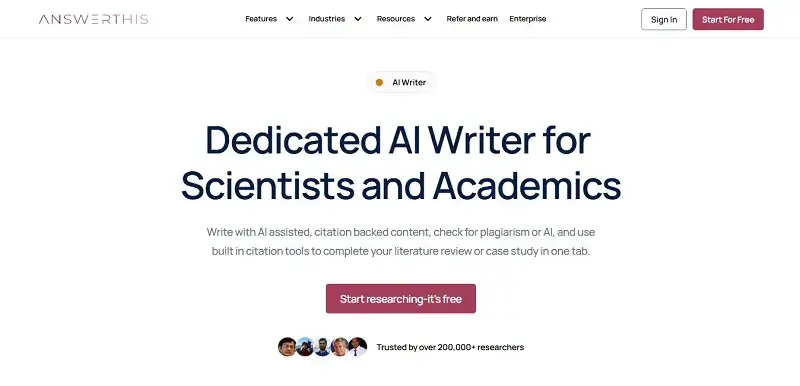
Creating high-quality content that ranks requires strong research, clear structure, and audience-focused writing. AnswerThis AI Writer is an advanced AI-powered tool designed to help creators, marketers, and researchers produce accurate, well-structured, and engaging content efficiently.
AnswerThis is different from traditional AI writers. It blends research insights right into the writing process. This helps users craft evidence-based articles, blogs, and marketing content with confidence. It can create full drafts, adjust tone, and boost readability. It also ensures the content matches user intent.
Features:
- Generates complete, structured content from a simple prompt.
- Provides research-backed insights to improve credibility.
- Allows tone and style customization based on audience.
- Helps with editing, rewriting, and content optimization.
- Saves time by combining research and writing in one platform.
Frequently Asked Questions
1. What are the best AI tools for WordPress bloggers?
Here are some top AI tools for WordPress bloggers:
- ChatGPT: Write content.
- Jasper: Create marketing materials.
- Surfer SEO: Optimize your content.
- Grammarly: Edit your writing.
- Canva AI: Design images.
They simplify life for bloggers by helping them write engaging, high-quality articles.
2. Can AI tools create a complete WordPress blog?
Yes, AI programs can create a complete WordPress blog. They help with idea generation, article writing, outlines, keywords, and even image creation. But you must always take the time to edit and personalize the material to suit your needs.
3. Is WordPress good for beginners starting a blog?
Yes, WordPress is great for beginners. It has an easy-to-use interface. You can choose from thousands of themes. There are useful plugins and great customization options, too. Beginners can design a professional blog even without knowing how to code. Additionally, AI technology makes it easy to write, optimize, and manage content.
4. Do AI-generated articles rank on Google?
AI-written articles can rank well on Google Search. They need to be unique, authentic, and helpful. They should also match what users are looking for. However, writing AI articles alone will not be enough. To improve your ranking, add personal views. Check your facts. Make sure it’s easy to read. Also, optimize for SEO.
5. How can AI help improve WordPress SEO?
AI helps boost WordPress SEO by:
- Suggesting keywords
- Optimizing titles
- Generating meta descriptions
- Improving headings
- Enhancing internal linking
- Making content easier to read
These features work together to improve your site’s visibility.
It helps find content gaps. It also helps bloggers write articles based on what users want.
6. Are AI tools free for WordPress bloggers?
Many AI tools come with a free plan, which is ideal for both beginners and small blogs. The free version has some limits, but it offers helpful features. You get tools for creating content, a grammar checker, a keyword generator, and a picture maker. The premium version unlocks more features for professional bloggers and businesses.
7. Can beginners use AI tools without technical knowledge?
Most AI-based tools feature interfaces designed for easy operation by anyone. Provide clear directions or prompts. The AI tool will handle the rest and give you something meaningful. It also simplifies content creation, SEO optimization, and blog management. You don’t need coding knowledge.
8. What AI tools can generate blog ideas?
Tools like ChatGPT, Jasper, Copy.ai, Notion AI, and Writesonic are top AI options. They excel at generating blog ideas. These tools can help bloggers overcome writer’s block. They also spark new ideas and create engaging content for their audiences.
9. What is the best AI tool for writing WordPress blog posts?
ChatGPT is one of the top AI tools for writing WordPress blog posts. It creates detailed and easy-to-read content. Among the other best tools are Jasper, Writesonic, and Copy.ai. We based this decision on your preferred writing style and budget requirements.
10. Can AI replace human writers?
AI is a great writing assistant. But it cannot completely replace humans. Human creativity, personal experience, emotions, and critical thinking are essential for quality work. The most successful combination is to use both the efficiency of AI and human abilities.
11. How many blog posts should a new WordPress website publish?
A new WordPress website should post one or two great blog posts each week. This helps search engines find your site. It builds trust with your audience and boosts your SEO. Remember to rank quality over quantity.
12. Are AI-generated images safe to use on WordPress websites?
AI-generated images are generally safe when made with legitimate software. Make sure it follows the platform’s terms and conditions. Before you post, check if it’s allowed on that platform. Also, avoid misleading images that don’t add value to your article.
13. How do AI tools help with keyword research?
Using AI tools simplifies keyword research. You can easily find good keywords and long-tail keywords by understanding search intent. The tools help you arrange keywords in your content easily. This way, you can create an SEO-friendly blog post.
14. What should I include in an AI prompt for writing blog content?
A good AI prompt includes clear details about:
- Your topic
- Target readers
- Writing style
- Word count
- Main keywords
- Headings
- Intended goal
These elements help guide the AI effectively.
Giving specific directions to the AI will help you get content that suits your needs.
15. Can AI tools optimize old WordPress blog posts?
Yes, indeed, AI tools are best suited for enhancing old WordPress blog posts’ SEO. AI tools can identify outdated content and suggest strong keywords. They enhance headings, rewrite weak paragraphs, and optimize meta titles and descriptions. They also boost readability and suggest internal links. AI tools can help add FAQs, update stats, and improve content structure. This ensures it meets current search intent.
Conclusion: AI Tools for WordPress Blog
Creating a blog on WordPress is simple. However, coming up with unique content can be tough. Crafting unique and fresh content for newbies can be overwhelming. Beginners can easily plan, create, and optimize content using advanced AI tools. WordPress users can use these tools to boost site engagement and performance.